快速开始
1. 注册应用
在 MoIds 平台注册您的应用,获取 Client ID 和 Client Secret。
curl -X POST https://moids.your-domain.com/api/v1/applications \
    -H "Content-Type: application/json" \
    -d '{"name": "Your App Name", "redirect_uri": "https://your-app.com/callback"}'
2. 配置回调地址
设置您的应用回调地址,用于接收授权码。
回调地址必须使用 HTTPS 协议(本地开发除外)。
3. 集成 SDK
选择合适的 SDK 集成到您的应用中。
// Node.js
const { MoIdsClient } = require('moids-node-sdk');

const client = new MoIdsClient({
    clientId: 'your-client-id',
    clientSecret: 'your-client-secret',
    redirectUri: 'https://your-app.com/callback'
});
OAuth 流程
授权码模式
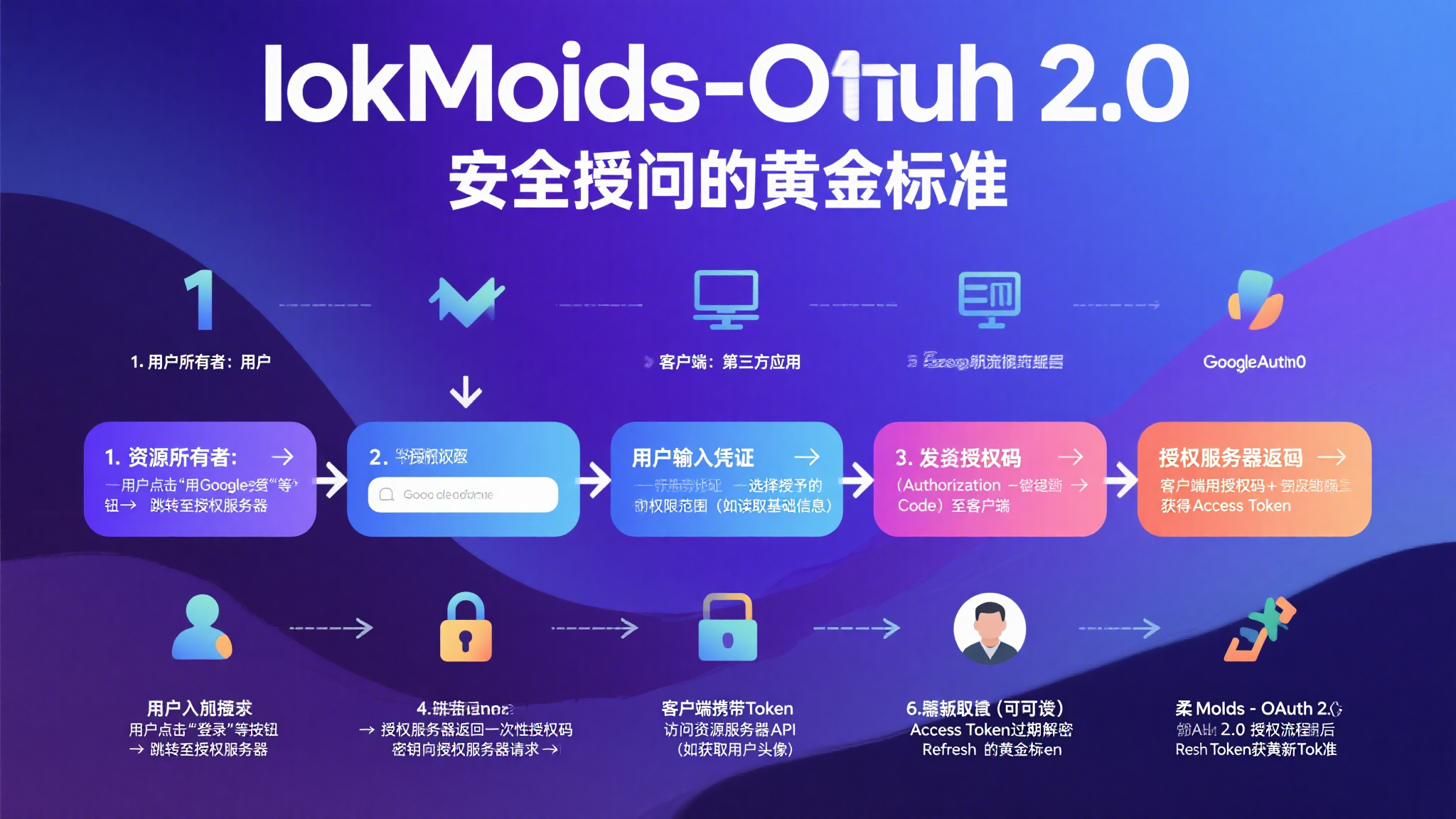
流程说明:
- 资源所有者(用户):用户点击"使用 MoIds 登录"按钮,跳转至授权服务器。
- 验证权限:用户在授权页面输入凭证,选择授予的权限范围。
- 发送授权码:授权服务器生成授权码并重定向回客户端。
- 换取 Token:客户端使用授权码向授权服务器请求访问令牌。
- 访问资源:客户端使用访问令牌调用资源服务器 API。
- 刷新令牌:当访问令牌过期时,使用刷新令牌获取新的访问令牌。
API 参考
认证端点
| 端点 | 方法 | 描述 |
|---|---|---|
/oauth/authorize |
GET | 获取授权码 |
/oauth/token |
POST | 获取访问令牌 |
SDK 使用
支持的语言和框架
Node.js
支持 Node.js 12+ 版本
v1.0.0
Python
支持 Python 3.6+
v1.0.0
Java
支持 Java 11+
v1.0.0
快速开始
const { MoIdsClient } = require('moids-oauth-node-sdk');

const client = new MoIdsClient({
    clientId: 'your-client-id',
    clientSecret: 'your-client-secret',
    redirectUri: 'https://your-app.com/callback',
    serverURL: 'https://oauth.your-domain.com'
});

// 生成授权URL
const authUrl = client.getAuthorizationUrl('state');

// 使用授权码获取访问令牌
const tokenResponse = await client.getAccessToken('authorization_code');

// 获取用户信息
const userInfo = await client.getUserInfo(tokenResponse.access_token);
from moids_oauth import MoIdsClient
client = MoIdsClient(
client_id='your-client-id',
client_secret='your-client-secret',
redirect_uri='https://your-app.com/callback',
server_url='https://oauth.your-domain.com'
)
# 生成授权URL
auth_url = client.get_authorization_url('state')
# 使用授权码获取访问令牌
token_response = client.get_access_token('authorization_code')
# 获取用户信息
user_info = client.get_user_info(token_response['access_token'])import com.moids.oauth.MoIdsClient;
MoIdsClient client = new MoIdsClient(
"your-client-id",
"your-client-secret",
"https://your-app.com/callback",
"https://oauth.your-domain.com"
);
// 生成授权URL
String authUrl = client.getAuthorizationUrl("state", "profile");
// 使用授权码获取访问令牌
String tokenResponse = client.getAccessToken("authorization_code");
// 获取用户信息
String userInfo = client.getUserInfo(accessToken);最佳实践
安全建议
- 始终使用 HTTPS
- 安全存储 Client Secret
- 实现令牌自动刷新
- 使用 state 参数防止 CSRF 攻击
常见问题
当访问令牌过期时,您可以使用刷新令牌获取新的访问令牌。建议在令牌过期前主动刷新。
目前支持授权码模式(Authorization Code)和客户端凭证模式(Client Credentials)。